Issue
I am trying to delete an investment transaction, and get the error below:
The Closed Parcels from this event have already been matched. Rollback Period Update or undo the Manual Parcel Matching of XXX on XX/XX/20XX to allow reversal.
Cause
In Class, the "Parcel Matches" concept is used to record the number of shares the fund is holding, including its purchase, cost base adjustments, and disposal records (refer to Maintain Parcel Matches)
A cost base adjustment or disposal will always have to be matched against a block of purchase. This is to calculate the cost base of the shares, as well as the gain/ loss on disposal.
The error message tells you, some disposal or cost base adjustment has been matched against the purchase and associated costs, and a gain/ loss has been calculated. Therefore the related transaction cannot be deleted.
Resolution
The resolution to this issue depends upon whether the parcel was done automatically by Class or manually.
Matching was done automatically by Class
The matching was automatically done by Class when you ran a Period Update.
- Rollback the Period Update - the match will be undone.
- Delete the transaction
Matching done manually
The matching was manually done by you or another user.
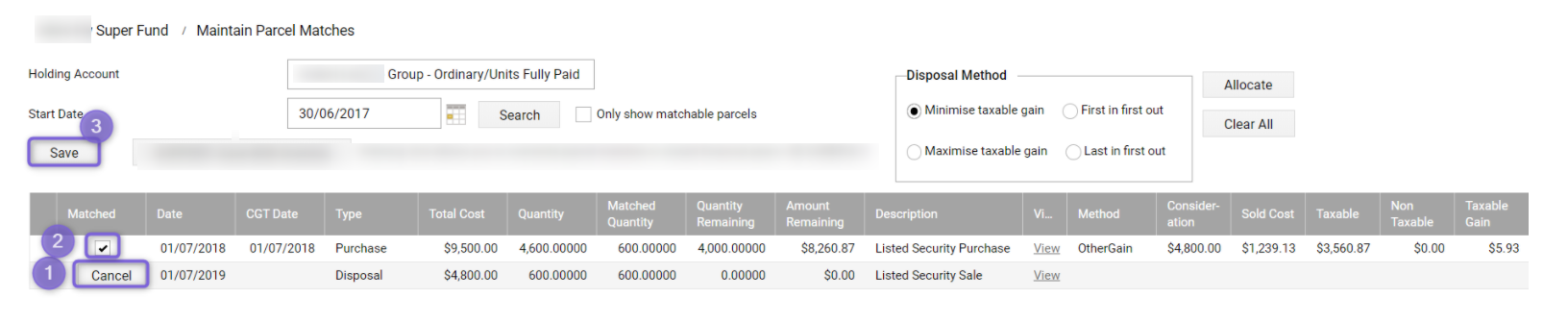
Navigate to Fund Level > Periodic Processing > Maintain Parcel Matches > Enter the investment code/ name > Search
- Click Edit next to the disposal/ cost base adjustment event - it will change the text to cancel, and a tick will appear where the parcel is matched against.
- Click on the box to untick the parcel it was matched against
- Click Save