This article includes information on how to implement member and pension related merge fields including:
- Overview
- Date parameter
- Repeating Text Block: Member
- Repeating Table Row: Member
- Repeating Text Block: Pension Account
- Repeating Table Row: Pension Account
- Sample templates
Overview
Member and Pension Account-level merge fields involve the use of repeating data. This article included information on how to use these merge fields. For a complete list of all merge fields refer to here.
When using merge fields at the Member or Pension Account level, certain parts of a document can be repeated depending on the data structure:
Text blocks- Entire paragraphs or sections of text can be repeated for each Member or Pension Account.
Tables rows- Individual rows within a table can be repeated so that each row represents a Member or a Pension Account.
Date parameter
The date parameter determines which period the data is included in the custom report.
For report packs, Report Date Range are used to determine the period.
For single report, Start Date & End Date are used to determine the period.
Some merge fields, have two separate period options- one for the Current Period and one for the Next Period. This facilitates different circumstances e.g. to include next year's pension obligation as part of a current year report pack.
Repeating Text Block: Member
To include a repeating section of text in a template, you need to mark the start and end of the block using specific tags.
Mark-up Instructions
Start of Repeating Text Block
Add the tag [RepeatStart:Member] above the text block you want to repeat
End of Repeating Text Block
Add the tag: [RepeatEnd:Member] below the text block you want to repeat
Example
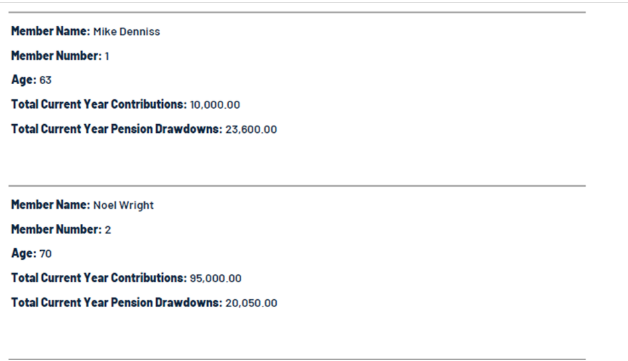
Sample output
Repeating Table Row: Member
To include a repeating table row, you need to mark up the first cell in the row.
Mark-up Instructions
Add [RepeatRow:Member] before any text or Merge Field in the first cell of relevant row.
Example
Sample Output

Repeating Text Block: Pension Account
The Pension Account repeat must sit within a Member repeat.
Mark-up Instructions
Start of Repeating Text Block
Add the tag [RepeatStart:PensionAccount] after [RepeatStart:Member]
End of Repeating Text Block
Add the tag [RepeatEnd:PensionAccount] before [RepeatEnd:Member]
There can be text and Member Merge Fields between [RepeatStart:Member] &[RepeatStart:PensionAccount] and [RepeatEnd:PensionAccount] & [RepeatEnd:Member]
Example
Sample Output
Repeating Table Row: Pension Account
The Pension Account Table Row Repeat must sit within a Member Repeat.
There are two variations of repeat table row for Pension Account:
- Table of Pension Account data within each repeating Member text block
- A single table of Pension Account data for all members
Mark-up – Variation 1
Add [RepeatRow:PensionAccount] before any text or Merge Field in the first cell of relevant row.
The table needs be after [RepeatStart:Member] and there can be text and Member Merge Fields between the [RepeatStart:Member] and table.
Example
Sample Output
Mark-up – Variation 2
Add [RepeatRow:PensionAccount] before any text or Merge Field in the first cell of relevant row.
The table needs be between[RepeatStart:Member] and [RepeatEnd:Member].
Example
Sample Output
Sample templates
The following Word templates are ready to use in Class. They contain merge field markup and repeat rows, so you can download them, customise the wording or formatting as needed, and put them straight to use.
- SMSF Cover Letter Class Template- Cover letter with tax position & contribution data for current financial year and pension payment obligation for next financial year.
- Pension Payment Obligations Next Period Class Template- Pension payment obligation for next financial year. Use this template if including this letter as part of a report pack with prior year date range.
- Pension Payment Obligations Current Period Class Template- Pension payment obligation for current financial year.
To ensure Class is populating the accurate pension payment data, you should process a Period Review for each pension account once the financials have been completed.