Issue
How can I distribute the retained earnings?
Resolution
Navigate to Fund level > Periodic Processing > Period Update > select the relevant Financial year
After running a period update to the end of the period, "Distribute Retained Earnings" will display.
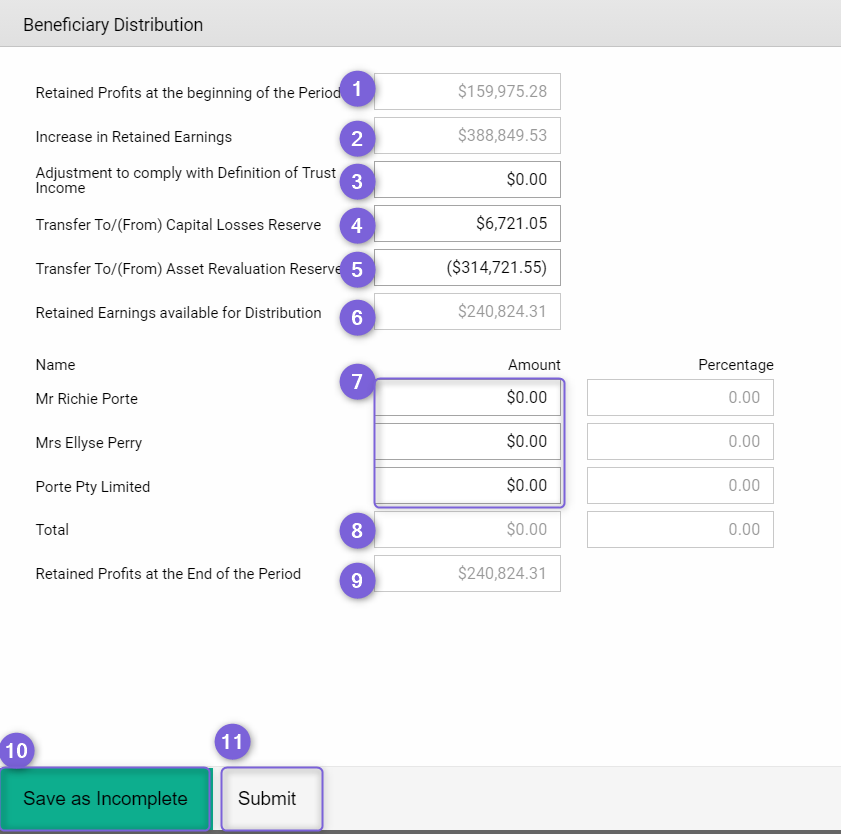
- Retained Profits at the beginning of the Period - this amount is carried from the prior year's Balance Sheet
- Increase in Retained Earnings - this amount is populated from "Net Profit (Loss) Total" on Profit and Loss statement
- Adjustment to Comply with Definition of Trust Income - enter the amount here to adjust the "Retained Earnings available for Distribution" to comply with trust income definition as per trust deed
- Transfer To/(From) Capital Loss Reserve - Edit the amount if needed. This is for transferring "accounting gain/loss" to "capital loss reserve"
- Transfer To/(From) Asset Revaluation Reserve - Edit amount if needed. This is for trusts that carry assets at market value. Any increase/decrease of market value can be transferred to "asset revaluation reserve"
- Retained Earnings available for Distribution - the total of the above fields
- Enter amount to each of the beneficiaries
- Total - total value has been allocated
- Retained Profits at the End of the Period - after submitting this event, this amount will show as Retained Earnings on the Balance Sheet
- Click on Save as Incomplete if this event has not been fully finalised
- Click on Submit to populate these numbers into the Financials
You can Edit or Delete this event if needed. Once you delete the event, all the numbers will be cancelled from the corresponding reports.