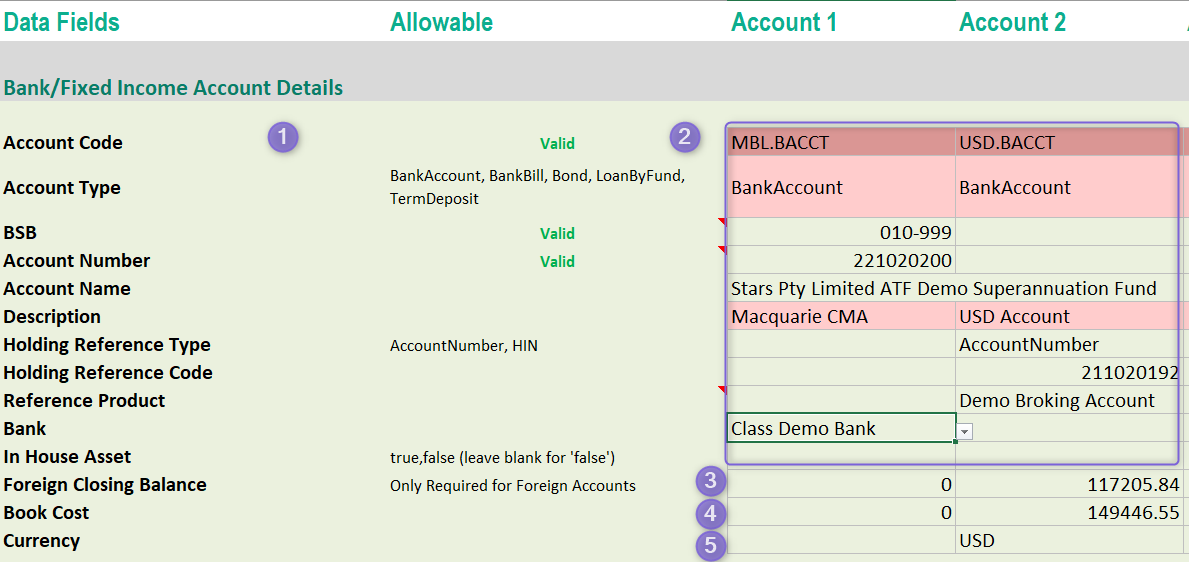
This article will guide you through how to use the cash tab of the Excel Fund Loader. This tab is where you enter the details of any bank accounts, including foreign bank accounts, that the portfolio holds.
- This column will either validate or provide information on the row that follows it.
- Enter the details of the bank account. All pink fields are mandatory (No spaces in the Account code fields and the codes must be unique. If you have already entered a feed product, this will fill in automatically when you enter the product number)
- The closing balance of the foreign account in the foreign currency (Only applicable for foreign cash accounts)
- The cost of foreign cash in AUD (Only applicable for foreign cash accounts)
- The currency of the foreign cash account (Only applicable for foreign cash accounts)
The current value of the foreign bank account should be entered in the opening balance tab in AUD.
What's Next
Review the Property Tab