Issue
I want to process Income from a Partnership Distribution in the Trust Tax Return. How can I do this?
Cause
There is no default Income/Expense type for Partnership Distribution Income currently available in Class Trust. Additionally, there is no mapping to the Partnership Distribution label in the Class Trust Tax Return.
Resolution
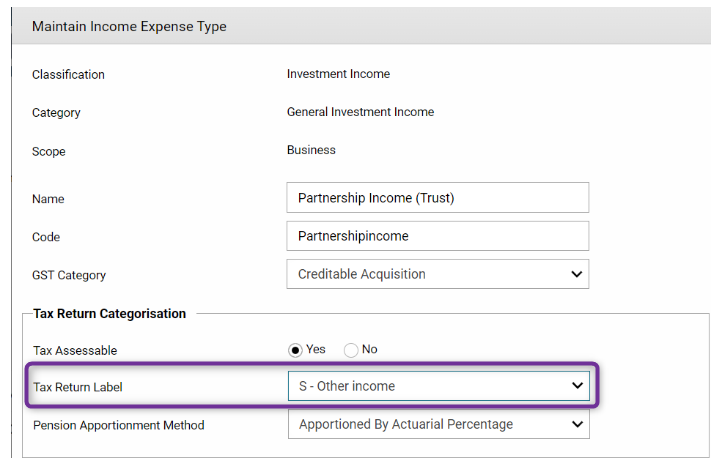
Step 1: Create an Income/Expense type and name it "Partnership Income"
Navigate to Business Level > Settings> Investment Income > General Investment Income> Income/Expense Type Income
- Select Tax Return Label as "Other Income"
Step 2:
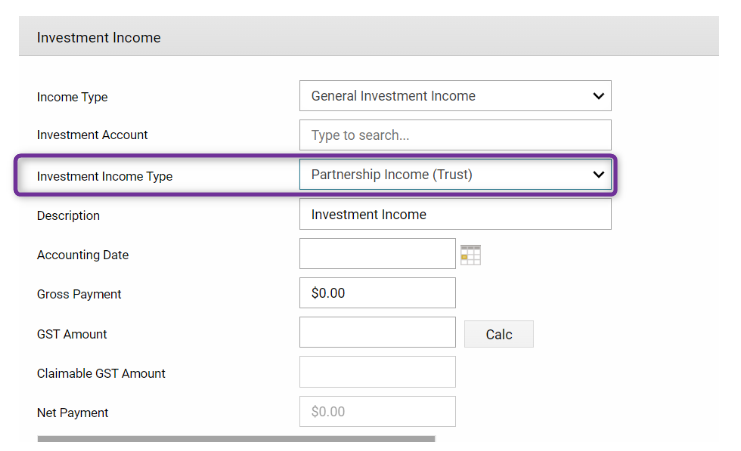
Navigate to Fund Level > Transactions > Fund Income > General Investment Income
- Select Investment Income Type as "Partnership Income (Trust)"
Step 3: Navigate to the Trust Tax Return at the fund level.
Navigate to Fund Level > Periodic Processing > Period updates
- Select the Financial Year - ensure you have already run the Period Update to 30 June
- Distribute Retained Earnings
- Click 'Submit'
- Click 'Finalise Tax'
Once you have completed the tax finalisation:
- View Tax Return
- Click "Complete" next to the Annual Return (Tax Return)
- Select Income Excluding Foreign Income on the side bar menu
- Enter the amount under Label 14 - Other Australian Income
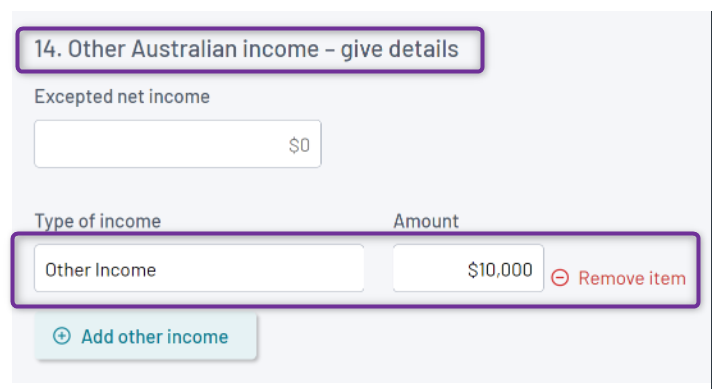
- Click 'Save'
- Click 'Validate'